1Overview
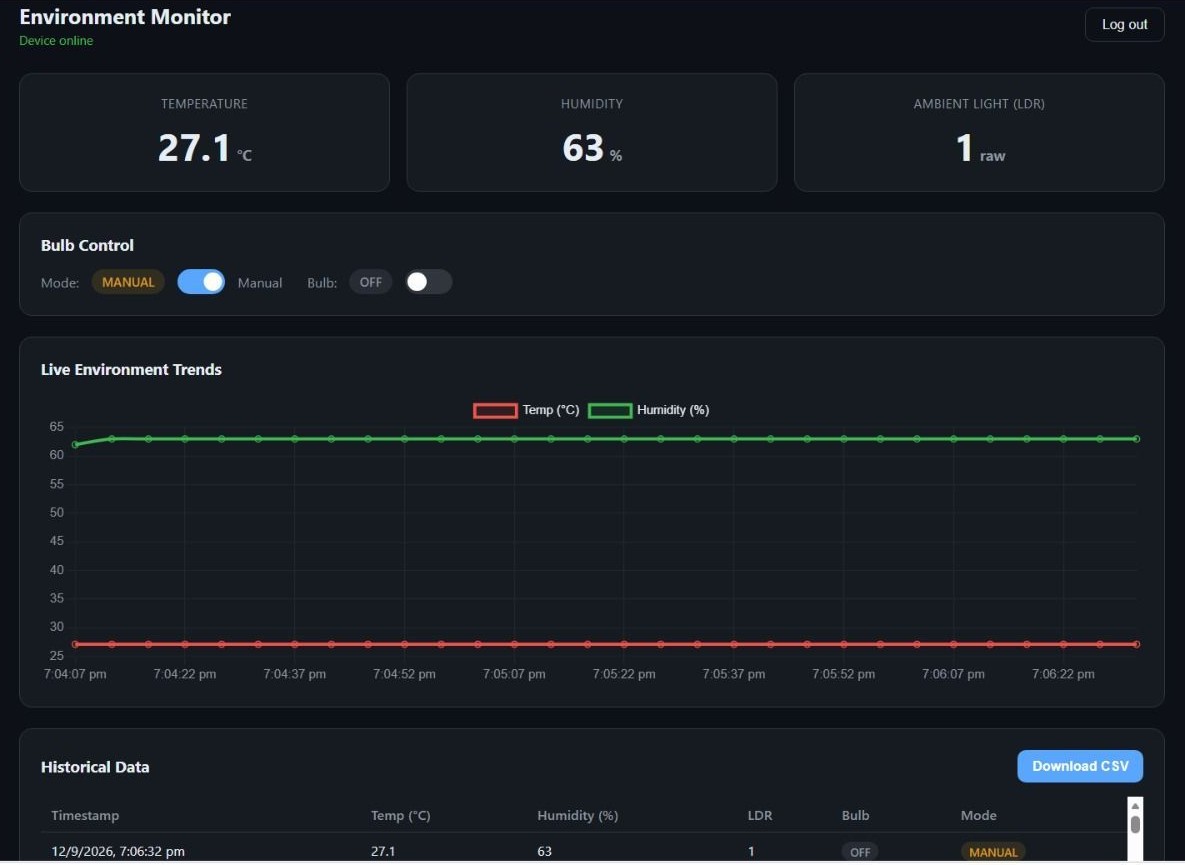
Objective. A private web dashboard for the bulb rig. After logging in, I can see live temperature, humidity and light level from the ESP32 and switch the bulb, from any device, anywhere.
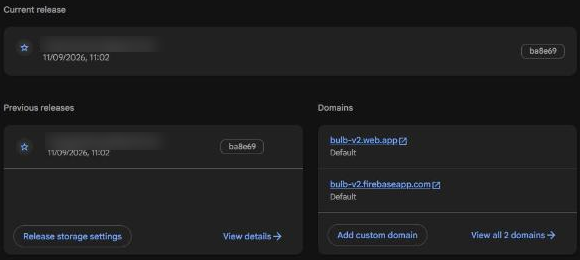
Live dashboard: https://bulb-v2.web.app/ (Firebase Hosting, first deployed 11 September 2026).
Summary. The ESP32 reads a DHT11 and an LDR and writes them to Firebase Realtime Database. The dashboard, protected by Firebase Authentication, listens to the same database: new readings appear without refreshing, and pressing a button writes a value the ESP32 picks up within a second.
2Concepts
Cloud computing
Using computing, storage and ready-made services over the internet instead of running my own servers. I pay (or, on Firebase's free Spark plan, don't) for what I use, and the provider handles the machines.
| Model | You get | Example |
|---|---|---|
| IaaS | Raw virtual machines, storage, networks; you manage the OS | AWS EC2, Google Compute Engine |
| PaaS | A platform that runs your code; no servers to manage | Google App Engine, Heroku |
| SaaS | A finished application you just use | Gmail, Google Docs |
| BaaS | Ready-made backend parts for apps: database, login, hosting | Firebase (used here) |
Cloud platform
A provider's collection of these services under one account. Firebase is Google's app platform and runs on Google Cloud.
Database and Firebase Realtime Database
A database is organised storage that programs can read and write. Firebase Realtime Database stores everything as one JSON tree and pushes every change to connected clients, which is why the dashboard updates the moment the ESP32 writes.
Cloud-based dashboard
A web page that shows live cloud data and sends commands back, usable from any browser.
Authentication and the login system
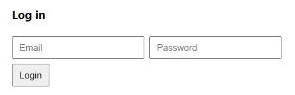
The dashboard and the ESP32 both sign in with an email and password through Firebase Authentication. Without a login, anyone who found the page could read the sensors or switch the bulb.
Authentication vs authorization
Authentication answers "who are you?" (the login). Authorization answers "what may you do?". Here the database rules authorize reads and writes only for signed-in users: "auth != null".
3System Design
| Path | Written by | Contents |
|---|---|---|
/sensors/current | ESP32 every 5 s | temperature, humidity, ldr, updatedAt |
/bulb | Dashboard (and the ESP32 in auto mode) | status (true/false), mode ("manual" or "auto") |
/settings/ldrThreshold | Dashboard | Number the LDR reading is compared with in auto mode |
/logs/<id> | ESP32 every 30 s (Task 5) | One timestamped row per reading |
4Hardware & Software
| Hardware | Software / services |
|---|---|
| ESP32 DevKit V1 | Arduino IDE with Firebase Arduino Client Library for ESP8266 and ESP32 (Mobizt) and DHT sensor library (Adafruit) |
| DHT11 temperature and humidity sensor | Firebase project bulb-v2: Realtime Database (Singapore, asia-southeast1), Authentication, Hosting |
| LDR + 10 kΩ resistor (voltage divider) | Firebase CLI to deploy the dashboard |
| 1-channel relay module + bulb (from Task 2) | Plain HTML + Firebase JS SDK 10 for the dashboard |
5Wiring / Setup
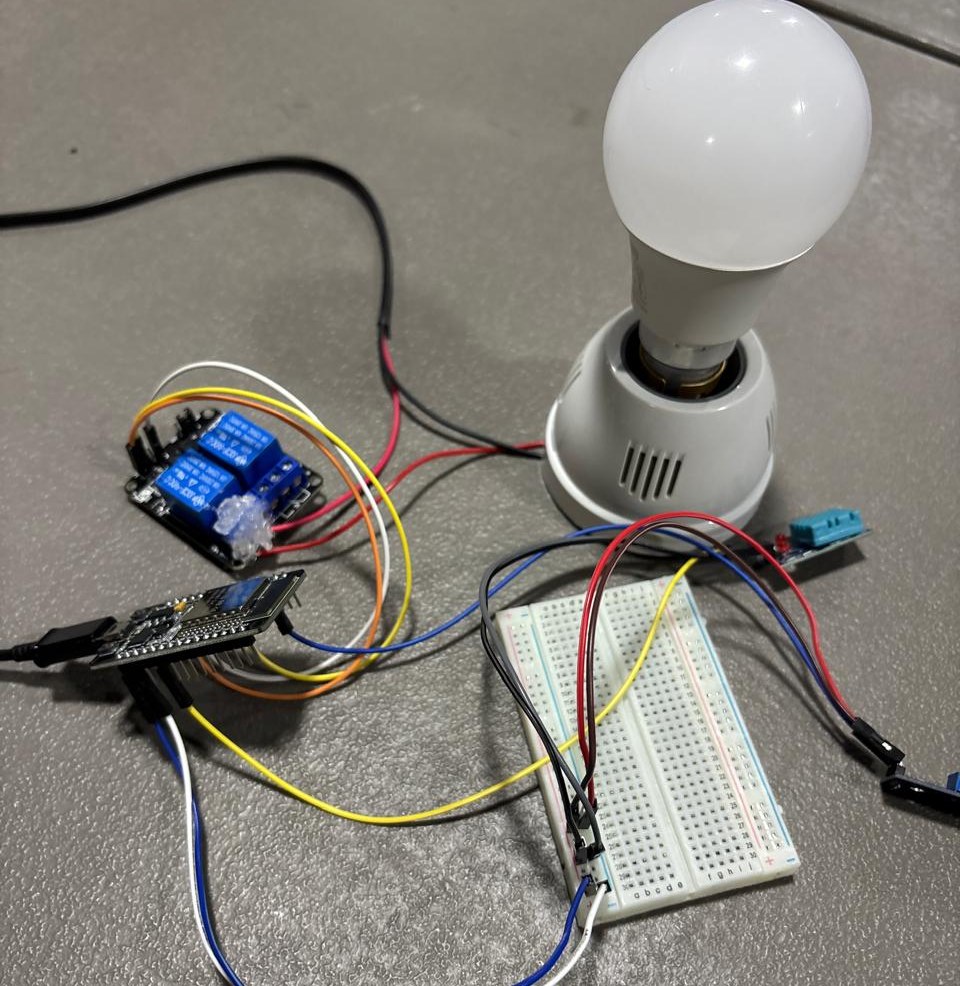
| Part | ESP32 pin | Notes |
|---|---|---|
| DHT11 data | GPIO4 | DHT11 modules have the pull-up resistor on board |
| LDR divider | GPIO34 | 3V3 → LDR → GPIO34 → 10 kΩ → GND; reading rises as the room gets brighter. GPIO34 is an ADC1 pin, which still works while Wi-Fi is on. |
| Relay IN | GPIO5 | This rig's relay module switches on with HIGH (RELAY_ACTIVE_LOW false); mains side as in Task 2 |
| Power | 3V3 / VIN / GND | Sensors on 3V3, relay on VIN (5 V) |
The LDR (light-dependent resistor) is there so the system can tell how bright the room is. On its own it only shows the light level; in Task 5 it drives the bulb automatically.
6Implementation
bulb_v2_firebase.inoview on GitHub
Credentials live in secrets.h, which is git-ignored. Copy secrets.example.h next to the sketch and fill it in.
/*
  Bulb-V2 — Firebase firmware (IoT Tasks 4 and 5)
  ESP32 DevKit V1 + DHT11 + LDR + 1-channel relay switching a bulb
  Pins match our rig: DHT11 GPIO4, LDR GPIO34, relay GPIO5.

  What it does
    - Reads the DHT11 (temperature, humidity) and the LDR every 5 s and writes them to
      /sensors/current, which the dashboard listens to.
    - Reads /bulb (status + mode) and /settings/ldrThreshold every second.
        manual mode: the relay follows /bulb/status, which the dashboard's button sets.
        auto mode:   the ESP32 decides from the LDR and writes /bulb/status itself,
                     so the dashboard always shows what the bulb is really doing.
    - Every 30 s pushes one timestamped entry under /logs (Task 5). The timestamp is the
      Firebase server time in milliseconds, which is what the dashboard's CSV export reads.

  Database layout (matches the dashboard in ../../dashboard/public/index.html)
    /sensors/current   { temperature, humidity, ldr, updatedAt }
    /bulb              { status: true|false, mode: "manual"|"auto" }
    /settings          { ldrThreshold: number }
    /logs/<pushId>     { timestamp, temperature, humidity, ldr, bulbState: "ON"|"OFF", mode }

  Libraries (Arduino Library Manager)
    - "Firebase Arduino Client Library for ESP8266 and ESP32" by Mobizt  (Firebase_ESP_Client.h)
    - "DHT sensor library" by Adafruit  (+ "Adafruit Unified Sensor")

  Before flashing: copy secrets.example.h to secrets.h and fill it in.
  secrets.h is in .gitignore so passwords never reach the repository.
*/

#include <Arduino.h>
#include <WiFi.h>
#include <Firebase_ESP_Client.h>
#include "addons/TokenHelper.h"   // prints token generation status
#include "addons/RTDBHelper.h"
#include <DHT.h>
#include "secrets.h"              // WIFI_SSID, WIFI_PASSWORD, API_KEY, DATABASE_URL, USER_EMAIL, USER_PASSWORD

// ---------- Pins ----------
#define DHT_PIN    4      // DHT11 data pin
#define DHT_TYPE   DHT11
#define LDR_PIN    34     // LDR voltage divider output (ADC1 pin, works while Wi-Fi is on)
#define RELAY_PIN  5      // relay module IN pin
#define RELAY_ACTIVE_LOW false  // this rig's relay switches ON with HIGH; set true for an active-LOW board

// ---------- Timing ----------
const unsigned long SENSOR_INTERVAL_MS  = 5000;   // how often /sensors/current is updated
const unsigned long CONTROL_INTERVAL_MS = 1000;   // how often /bulb and the threshold are read
const unsigned long LOG_INTERVAL_MS     = 30000;  // how often a row is added to /logs

// ---------- Auto mode ----------
// Wiring: 3.3V -> LDR -> GPIO34 -> 10k -> GND, so the reading goes UP when the room is brighter.
// The bulb turns ON when the reading drops below (threshold - HYSTERESIS) and OFF when it
// rises above (threshold + HYSTERESIS). The gap stops the relay chattering near the threshold.
const int HYSTERESIS = 100;

DHT dht(DHT_PIN, DHT_TYPE);

FirebaseData fbdo;
FirebaseAuth auth;
FirebaseConfig config;

bool   bulbOn       = false;
String mode         = "manual";
int    ldrThreshold = 1500;

float  lastTemp = NAN;
float  lastHum  = NAN;
int    lastLdr  = 0;

unsigned long lastSensorMs  = 0;
unsigned long lastControlMs = 0;
unsigned long lastLogMs     = 0;

// ---------- Relay ----------
// Active-HIGH board (this rig): drive the pin HIGH for ON, LOW for OFF.
// Active-LOW board: drive LOW for ON, and release the pin (INPUT, high impedance) for OFF.
//   Driving a 5 V relay module's input HIGH from a 3.3 V ESP32 pin can leak enough current to
//   keep it half-on; releasing the pin avoids that (the fix from my LCU-1 firmware).
void setRelay(bool on) {
  bulbOn = on;
  if (RELAY_ACTIVE_LOW) {
    if (on) {
      pinMode(RELAY_PIN, OUTPUT);
      digitalWrite(RELAY_PIN, LOW);
    } else {
      pinMode(RELAY_PIN, INPUT);
    }
  } else {
    pinMode(RELAY_PIN, OUTPUT);
    digitalWrite(RELAY_PIN, on ? HIGH : LOW);
  }
  Serial.printf("Relay -> %s\n", on ? "ON" : "OFF");
}

// ---------- Wi-Fi ----------
void connectWiFi() {
  WiFi.mode(WIFI_STA);
  WiFi.begin(WIFI_SSID, WIFI_PASSWORD);
  Serial.print("Connecting to Wi-Fi");
  while (WiFi.status() != WL_CONNECTED) {
    delay(500);
    Serial.print(".");
  }
  Serial.print("\nConnected, IP: ");
  Serial.println(WiFi.localIP());
}

// ---------- Firebase ----------
void connectFirebase() {
  config.api_key      = API_KEY;
  config.database_url = DATABASE_URL;
  auth.user.email     = USER_EMAIL;      // same email/password user as the dashboard login
  auth.user.password  = USER_PASSWORD;
  config.token_status_callback = tokenStatusCallback;

  Firebase.reconnectNetwork(true);
  fbdo.setBSSLBufferSize(4096, 1024);
  Firebase.begin(&config, &auth);

  Serial.print("Signing in to Firebase");
  while (!Firebase.ready()) {
    delay(300);
    Serial.print(".");
  }
  Serial.println(" ready");
}

// Creates /bulb and /settings with defaults the first time, so the dashboard has something to show.
void ensureDefaults() {
  bool hasMode = Firebase.RTDB.getString(&fbdo, "/bulb/mode") && fbdo.dataType() != "null";
  if (!hasMode) {
    Firebase.RTDB.setString(&fbdo, "/bulb/mode", "manual");
    Firebase.RTDB.setBool(&fbdo, "/bulb/status", false);
  }
  bool hasThreshold = Firebase.RTDB.getInt(&fbdo, "/settings/ldrThreshold") && fbdo.dataType() != "null";
  if (!hasThreshold) {
    Firebase.RTDB.setInt(&fbdo, "/settings/ldrThreshold", ldrThreshold);
  }
}

// ---------- Sensors -> /sensors/current ----------
void readAndUploadSensors() {
  float t = dht.readTemperature();
  float h = dht.readHumidity();
  lastLdr = analogRead(LDR_PIN);           // 0 (dark) .. 4095 (bright)

  if (isnan(t) || isnan(h)) {
    Serial.println("DHT11 read failed, keeping the last good values");
  } else {
    lastTemp = t;
    lastHum  = h;
  }

  FirebaseJson json;
  if (!isnan(lastTemp)) json.set("temperature", lastTemp);
  if (!isnan(lastHum))  json.set("humidity", lastHum);
  json.set("ldr", lastLdr);
  json.set("updatedAt/.sv", "timestamp");  // server time, so it is right even without NTP

  if (Firebase.RTDB.updateNode(&fbdo, "/sensors/current", &json)) {
    Serial.printf("Sensors: %.1f C, %.0f %%, LDR %d\n", lastTemp, lastHum, lastLdr);
  } else {
    Serial.printf("Sensor upload failed: %s\n", fbdo.errorReason().c_str());
  }
}

// ---------- /bulb + /settings -> relay ----------
void syncControl() {
  if (Firebase.RTDB.getInt(&fbdo, "/settings/ldrThreshold")) {
    ldrThreshold = fbdo.to<int>();
  }

  if (!Firebase.RTDB.getJSON(&fbdo, "/bulb")) {
    Serial.printf("Reading /bulb failed: %s\n", fbdo.errorReason().c_str());
    return;
  }
  FirebaseJson &bulb = fbdo.to<FirebaseJson>();
  FirebaseJsonData r;
  bool wantedOn = bulbOn;
  if (bulb.get(r, "mode") && r.success)   mode = r.to<String>();
  if (bulb.get(r, "status") && r.success) wantedOn = r.to<bool>();

  if (mode == "auto") {
    // The ESP32 decides, then tells the database so the dashboard shows the real state.
    bool next = bulbOn;
    if (lastLdr < ldrThreshold - HYSTERESIS) next = true;    // dark  -> bulb on
    if (lastLdr > ldrThreshold + HYSTERESIS) next = false;   // bright -> bulb off
    if (next != bulbOn) {
      setRelay(next);
      Firebase.RTDB.setBool(&fbdo, "/bulb/status", next);
    }
  } else {
    // Manual: follow the dashboard button.
    if (wantedOn != bulbOn) setRelay(wantedOn);
  }
}

// ---------- One row -> /logs (Task 5) ----------
void pushLog() {
  FirebaseJson row;
  row.set("timestamp/.sv", "timestamp");   // milliseconds since 1970, set by the server
  if (!isnan(lastTemp)) row.set("temperature", lastTemp);
  if (!isnan(lastHum))  row.set("humidity", lastHum);
  row.set("ldr", lastLdr);
  row.set("bulbState", bulbOn ? "ON" : "OFF");
  row.set("mode", mode);

  if (Firebase.RTDB.pushJSON(&fbdo, "/logs", &row)) {
    Serial.printf("Logged row %s\n", fbdo.pushName().c_str());
  } else {
    Serial.printf("Log push failed: %s\n", fbdo.errorReason().c_str());
  }
}

void setup() {
  Serial.begin(115200);
  setRelay(false);                 // bulb off until we know what the dashboard wants
  dht.begin();
  analogReadResolution(12);

  connectWiFi();
  connectFirebase();
  ensureDefaults();

  readAndUploadSensors();
  syncControl();
  pushLog();
  lastSensorMs = lastControlMs = lastLogMs = millis();
}

void loop() {
  if (!Firebase.ready()) return;   // token refresh or reconnect in progress

  unsigned long now = millis();

  if (now - lastSensorMs >= SENSOR_INTERVAL_MS) {
    lastSensorMs = now;
    readAndUploadSensors();
  }
  if (now - lastControlMs >= CONTROL_INTERVAL_MS) {
    lastControlMs = now;
    syncControl();
  }
  if (now - lastLogMs >= LOG_INTERVAL_MS) {
    lastLogMs = now;
    pushLog();
  }
}
Key sections (ESP32)
- Signing in —
connectFirebase()passes the web API key, database URL and the same email/password user the dashboard uses.Firebase.ready()becomes true once the token is issued and refreshes it automatically. - Temperature and humidity —
readAndUploadSensors()reads the DHT11 and the LDR and writes them in oneupdateNode()call to/sensors/current. A failed DHT read keeps the last good value instead of sending NaN. - Bulb control —
syncControl()reads/bulbevery second. In manual mode the relay follows/bulb/status, which the dashboard button sets. - Relay polarity —
RELAY_ACTIVE_LOWsets how the pin drives the relay. This rig's module switches on with HIGH. For an active-LOW board, OFF releases the pin (INPUT) instead of driving 3.3 V into the 5 V input, the leakage fix from Task 2.
index.htmlview on GitHub
The dashboard as deployed to bulb-v2.web.app.
<!DOCTYPE html>
<html lang="en">
<head>
<meta charset="UTF-8">
<meta name="viewport" content="width=device-width, initial-scale=1.0">
<title>Bulb-V2 Dashboard</title>
<script src="https://www.gstatic.com/firebasejs/10.8.0/firebase-app-compat.js"></script>
<script src="https://www.gstatic.com/firebasejs/10.8.0/firebase-auth-compat.js"></script>
<script src="https://www.gstatic.com/firebasejs/10.8.0/firebase-database-compat.js"></script>
<style>
body { font-family: system-ui, sans-serif; max-width: 480px; margin: 60px auto; padding: 0 20px; }
input, button { font-size: 15px; padding: 8px 10px; margin: 4px 4px 4px 0; }
button { cursor: pointer; }
#dash p { font-size: 16px; }
</style>
</head>
<body>
<div id="authDiv">
<h3>Log in</h3>
<input id="email" type="email" placeholder="Email">
<input id="pass" type="password" placeholder="Password">
<button onclick="login()">Login</button>
</div>
<div id="dash" style="display:none">
<h2>Bulb-V2 Dashboard <button onclick="auth.signOut()">Logout</button></h2>
<p>Temp: <span id="t">-</span>°C | Humidity: <span id="h">-</span>% | LDR: <span id="l">-</span></p>
<p>Bulb: <span id="b">-</span> | Mode: <span id="m">-</span></p>
<button onclick="toggleMode()">Toggle Mode</button>
<button onclick="toggleBulb()">Toggle Bulb (manual only)</button>
<br><br>
<label>LDR Threshold: <input id="th" type="number" onchange="setTh(this.value)"></label>
<br><br>
<button onclick="exportCSV()">Download Logs CSV</button>
</div>
<script>
// Paste your config from Firebase Console > Project settings > General > Your apps
const firebaseConfig = {
apiKey: "AIzaSyBMG_YE_Hc0sXN34GXI2USB7i3XucQmfPw",
authDomain: "bulb-v2.firebaseapp.com",
databaseURL: "https://bulb-v2-default-rtdb.asia-southeast1.firebasedatabase.app",
projectId: "bulb-v2",
};
firebase.initializeApp(firebaseConfig);
const auth = firebase.auth();
const db = firebase.database();
let cur = {};
function login() {
auth.signInWithEmailAndPassword(email.value, pass.value).catch(err => alert(err.message));
}
auth.onAuthStateChanged(user => {
authDiv.style.display = user ? 'none' : 'block';
dash.style.display = user ? 'block' : 'none';
if (user) {
db.ref('sensors/current').on('value', s => {
const v = s.val() || {};
t.innerText = v.temperature ?? '-';
h.innerText = v.humidity ?? '-';
l.innerText = v.ldr ?? '-';
});
db.ref('bulb').on('value', s => {
cur = s.val() || {};
b.innerText = cur.status ? "ON" : "OFF";
m.innerText = cur.mode || '-';
});
db.ref('settings/ldrThreshold').on('value', s => {
th.value = s.val() ?? 0;
});
}
});
function toggleMode() {
db.ref('bulb/mode').set(cur.mode === 'manual' ? 'auto' : 'manual');
}
function toggleBulb() {
if (cur.mode === 'manual') db.ref('bulb/status').set(!cur.status);
}
function setTh(v) {
db.ref('settings/ldrThreshold').set(Number(v));
}
function exportCSV() {
db.ref('logs').once('value', snap => {
let csv = "Timestamp,Temp,Humidity,LDR,Bulb,Mode\n";
snap.forEach(child => {
const v = child.val();
csv += `${new Date(v.timestamp).toLocaleString()},${v.temperature},${v.humidity},${v.ldr},${v.bulbState},${v.mode}\n`;
});
const blob = new Blob([csv], { type: 'text/csv' });
const a = document.createElement('a');
a.href = URL.createObjectURL(blob);
a.download = 'logs.csv';
a.click();
});
}
</script>
</body>
</html>
Key sections (dashboard)
- Login — the form calls
signInWithEmailAndPassword();onAuthStateChangedswaps the login form for the dashboard only when Firebase reports a signed-in user. - Live data —
on('value')listeners onsensors/current,bulbandsettings/ldrThresholdupdate the page whenever the database changes. - Control — Toggle Bulb flips
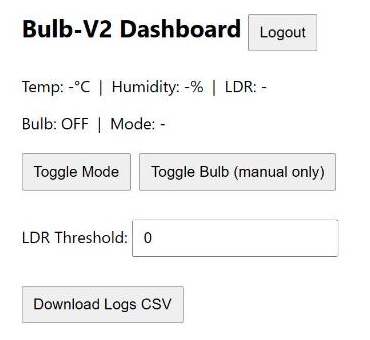
bulb/status(manual mode only); Toggle Mode switches between manual and auto.
7Configuration
- Firebase console → created project Bulb-V2 (Spark plan).
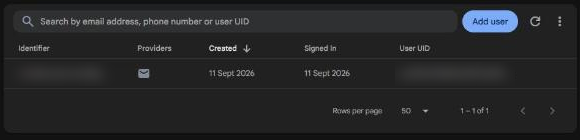
- Authentication → Sign-in method → enabled Email/Password, then added one user.
- Realtime Database → created in Singapore (asia-southeast1) and set the rules to
auth != null. - Project settings → added a web app and copied its config into the dashboard.
firebase init hostingwithpublicas the folder, thenfirebase deploy→ bulb-v2.web.app.
apiKey in a Firebase web config is meant to be public; it only identifies the project. The database rules are what protect the data.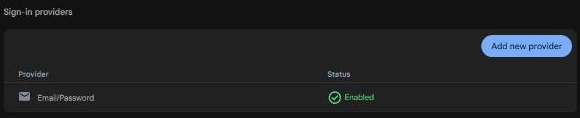

database.rules.json
{
  "rules": {
    ".read": "auth != null",
    ".write": "auth != null"
  }
}
8Evidence


9Challenges & Fixes
Problem. Firebase warned that the database rules were not secure.
Why. The rules allow any signed-in user to read and write everything. That is fine for one owner, but the console flags it.
Fix. Kept auth != null and only created one user. The next step would be per-path rules, so only the ESP32 can write sensor data.
Problem. The ESP32 was refused by the database.
Why. With auth != null, an unauthenticated device gets "Permission denied".
Fix. The firmware signs in with the same Email/Password user, and waits for Firebase.ready() before reading or writing.
Problem. Readings stopped updating and the dashboard still showed old values.
Why. When the ESP32 is off, /sensors/current keeps the last values, so the page looks live when it isn't.
Fix. The firmware writes a server timestamp (updatedAt) with every reading; the Task 5 dashboard uses it to show whether the ESP32 is online.
Problem. The DHT11 occasionally returned no reading.
Why. The DHT11 is slow and sometimes fails a read, which gives NaN.
Fix. Failed reads are skipped and the last good value is kept, so NaN never reaches the database.
10Reflection
Firebase showed me how much of a backend I don't have to build: login, a live database and hosting came ready, and my work went into the data structure and the rules. Designing the database paths first made both the ESP32 code and the dashboard simpler, because each side only has to agree on a few names. I also understood the difference between logging in and being allowed to do something, because the rules are a separate layer from the login.
11Repository Link
All code for this task: https://github.com/TringyTrongy/protosem-iot/tree/main/task4-firebase-dashboard (ESP32 firmware in firmware/, dashboard in dashboard/)
✓Checklist coverage
Every item from the IoT Portfolio Guide for this task, and where it is on this page.
| Guide item | Where |
|---|---|
| Objective of the Firebase IoT monitoring system | 1. Overview |
| Basic concept of cloud computing | 2. Concepts |
| IaaS, PaaS, SaaS and BaaS | 2. Concepts |
| What a cloud platform is | 2. Concepts |
| What a database is | 2. Concepts |
| Firebase Realtime Database | 2. Concepts |
| What a cloud-based dashboard is | 2. Concepts |
| Authentication and the purpose of a login | 2. Concepts |
| Authentication vs authorization | 2. Concepts |
| Firebase project setup | 7. Configuration |
| Firebase Authentication configuration | 7. Configuration |
| Realtime Database structure | 3. System Design |
| Database / data-flow architecture | 3. System Design |
| DHT11 connection | 5. Wiring / Setup |
| Temperature and humidity on the dashboard | 8. Evidence |
| LDR sensor and its purpose | 5. Wiring / Setup |
| Bulb ON/OFF control from the dashboard | 6. Implementation |
| Communication flow between ESP32, Firebase and dashboard | 3. System Design |
| Complete ESP32 source code | 6. Implementation |
| Complete dashboard source code | 6. Implementation |
| Login page screenshot | 8. Evidence |
| Firebase database screenshot | 8. Evidence |
| Working dashboard screenshot | 8. Evidence |
| Photographs of the prototype | 8. Evidence |
| Problems and solutions | 9. Challenges & Fixes |
| Reflection | 10. Reflection |