1Overview
Objective. Turn the Task 4 rig into a complete home-automation system: every reading is logged with a timestamp, the bulb can run in manual or automatic mode (switched by the LDR against a threshold set from the dashboard), the history is shown as a chart and a table, and the full log can be downloaded as a CSV file.
Dashboard with history: https://bulb-v2.web.app/v2.html
2Concepts
Data logging
Saving every reading with the time it was taken, so you can see trends instead of only the current value.
Manual vs automatic control
In manual mode a person decides; in automatic mode the device decides from a rule. A mode value in the database lets the dashboard switch between them without reflashing the ESP32.
Threshold and hysteresis
The bulb turns on when the light level drops below a set value. The LDR reading is noisy, so a single threshold would make the relay chatter when the light sits right at the edge. The firmware uses a ±100 band: on below threshold − 100, off above threshold + 100, unchanged in between.
CSV
Comma-separated values: a plain-text table that opens in Excel or Google Sheets.
3System Design
Automatic lighting logic
every 1 s:
  read /bulb (mode, status) and /settings/ldrThreshold
  if mode == "auto":
      if ldr < threshold - 100:  bulb = ON      (dark)
      if ldr > threshold + 100:  bulb = OFF     (bright)
      write the decision to /bulb/status        (so the dashboard shows the real state)
  else:
      relay follows /bulb/status                (dashboard button)
every 30 s:
push { timestamp, temperature, humidity, ldr, bulbState, mode } to /logs4Hardware & Software
| Hardware | Software / services |
|---|---|
| Same rig as Task 4: ESP32, DHT11, LDR + 10 kΩ, relay, bulb | Task 4 firmware (logging and auto mode are built in) |
| Dashboard v2: Firebase JS SDK 10 + Chart.js 4 for the history chart | |
| Firebase Realtime Database, Authentication, Hosting |
5Wiring / Setup
Same as Task 4: DHT11 on GPIO4, LDR divider on GPIO34, relay on GPIO5.
LDR calibration
- With auto mode off, read the LDR value on the dashboard with the room lights on.
- Cover the LDR with a finger (or switch the room light off) and read it again.
- Set the threshold roughly halfway between the two from the dashboard; it is saved to
/settings/ldrThresholdand the ESP32 picks it up within a second.
6Implementation
Logging (ESP32)
pushLog() in the firmware pushes one row to /logs every 30 seconds. pushJSON() gives each row a unique, time-ordered key, and the timestamp is filled in by the Firebase server ({".sv": "timestamp"}), so it is correct even though the ESP32 has no clock.
void pushLog() {
  FirebaseJson row;
  row.set("timestamp/.sv", "timestamp");   // milliseconds since 1970, set by the server
  row.set("temperature", lastTemp);
  row.set("humidity", lastHum);
  row.set("ldr", lastLdr);
  row.set("bulbState", bulbOn ? "ON" : "OFF");
  row.set("mode", mode);
  Firebase.RTDB.pushJSON(&fbdo, "/logs", &row);
}
Log structure
/logs
  -Nx3aQ...  { "timestamp": 1792089000000, "temperature": 28.4, "humidity": 61,
               "ldr": 1834, "bulbState": "OFF", "mode": "auto" }
  -Nx3aZ...  { ... one row every 30 s ... }
Full firmware: bulb_v2_firebase.ino (syncControl() for auto mode, pushLog() for logging).
v2.htmlview on GitHub
Dashboard v2: everything from Task 4 plus a live/offline indicator, a history chart, a table of recent entries and the CSV download.
<!DOCTYPE html>
<html lang="en">
<head>
<meta charset="UTF-8">
<meta name="viewport" content="width=device-width, initial-scale=1.0">
<title>Bulb-V2 Dashboard</title>
<script src="https://www.gstatic.com/firebasejs/10.8.0/firebase-app-compat.js"></script>
<script src="https://www.gstatic.com/firebasejs/10.8.0/firebase-auth-compat.js"></script>
<script src="https://www.gstatic.com/firebasejs/10.8.0/firebase-database-compat.js"></script>
<script src="https://cdnjs.cloudflare.com/ajax/libs/Chart.js/4.4.1/chart.umd.min.js"></script>
<style>
  :root { --bg:#0f1115; --panel:#171a21; --line:#262b35; --fg:#e8eaf0; --dim:#9aa3b2; --on:#f5b301; --ok:#22c55e; --bad:#ef4444; --accent:#60a5fa; }
  * { box-sizing:border-box; }
  body { margin:0; background:var(--bg); color:var(--fg); font:15px/1.45 system-ui,-apple-system,Segoe UI,Roboto,sans-serif; }
  .wrap { max-width:980px; margin:0 auto; padding:24px 16px 48px; }
  h1 { font-size:22px; margin:0; }
  header { display:flex; align-items:center; justify-content:space-between; gap:12px; margin-bottom:18px; flex-wrap:wrap; }
  .pill { display:inline-flex; align-items:center; gap:6px; font-size:13px; color:var(--dim); }
  .dot { width:9px; height:9px; border-radius:50%; background:var(--bad); }
  .dot.live { background:var(--ok); }
  .grid { display:grid; grid-template-columns:repeat(auto-fit,minmax(200px,1fr)); gap:12px; }
  .card { background:var(--panel); border:1px solid var(--line); border-radius:12px; padding:16px; }
  .label { color:var(--dim); font-size:13px; }
  .big { font-size:30px; font-weight:600; margin-top:4px; font-variant-numeric:tabular-nums; }
  .unit { font-size:15px; color:var(--dim); font-weight:400; }
  button, input { font:inherit; }
  button { background:#232835; color:var(--fg); border:1px solid var(--line); border-radius:8px; padding:9px 14px; cursor:pointer; }
  button:hover { border-color:var(--accent); }
  button.primary { background:var(--accent); border-color:var(--accent); color:#0b1220; font-weight:600; }
  button:disabled { opacity:.45; cursor:not-allowed; }
  input { background:#0c0e12; color:var(--fg); border:1px solid var(--line); border-radius:8px; padding:9px 10px; }
  .row { display:flex; gap:8px; flex-wrap:wrap; align-items:center; margin-top:10px; }
  .bulb { font-size:30px; font-weight:600; margin-top:4px; }
  .bulb.on { color:var(--on); }
  .section { margin-top:22px; }
  .section h2 { font-size:16px; margin:0 0 10px; }
  table { width:100%; border-collapse:collapse; font-size:13px; font-variant-numeric:tabular-nums; }
  th, td { text-align:left; padding:7px 8px; border-bottom:1px solid var(--line); }
  th { color:var(--dim); font-weight:500; }
  .tablewrap { overflow-x:auto; }
  #authDiv { max-width:360px; margin:12vh auto 0; }
  #authDiv input { width:100%; margin-top:8px; }
  #authDiv button { width:100%; margin-top:12px; }
  .err { color:var(--bad); font-size:13px; min-height:18px; margin-top:8px; }
  .muted { color:var(--dim); font-size:13px; }
</style>
</head>
<body>

<div id="authDiv" class="wrap">
  <div class="card">
    <h1>Bulb-V2</h1>
    <p class="muted">Sign in to monitor and control the bulb.</p>
    <input id="email" type="email" placeholder="Email" autocomplete="username">
    <input id="pass" type="password" placeholder="Password" autocomplete="current-password">
    <button class="primary" onclick="login()">Log in</button>
    <div id="authErr" class="err"></div>
  </div>
</div>

<div id="dash" class="wrap" style="display:none">
  <header>
    <div>
      <h1>Bulb-V2 Dashboard</h1>
      <span class="pill"><span id="liveDot" class="dot"></span><span id="liveText">Waiting for the ESP32…</span></span>
    </div>
    <button onclick="auth.signOut()">Log out</button>
  </header>

  <div class="grid">
    <div class="card"><div class="label">Temperature</div><div class="big"><span id="t">–</span> <span class="unit">°C</span></div></div>
    <div class="card"><div class="label">Humidity</div><div class="big"><span id="h">–</span> <span class="unit">%</span></div></div>
    <div class="card"><div class="label">Light level (LDR, 0–4095)</div><div class="big"><span id="l">–</span></div></div>
    <div class="card">
      <div class="label">Bulb</div>
      <div id="b" class="bulb">–</div>
      <div class="muted">Mode: <b id="m">–</b></div>
    </div>
  </div>

  <div class="grid section">
    <div class="card">
      <div class="label">Control</div>
      <div class="row">
        <button onclick="toggleMode()">Switch to <span id="otherMode">auto</span></button>
        <button id="bulbBtn" onclick="toggleBulb()">Toggle bulb</button>
      </div>
      <p class="muted" id="modeHint">In manual mode the button switches the bulb. In auto mode the ESP32 decides from the LDR.</p>
    </div>
    <div class="card">
      <div class="label">Auto mode threshold</div>
      <div class="row">
        <input id="th" type="number" min="0" max="4095" style="width:120px">
        <button onclick="setTh(th.value)">Save</button>
      </div>
      <p class="muted">Bulb turns on when the LDR reading drops below this (with ±100 hysteresis).</p>
    </div>
  </div>

  <div class="section card">
    <h2>History <span class="muted">(last 50 log entries)</span></h2>
    <canvas id="histChart" height="110"></canvas>
  </div>

  <div class="section card">
    <div class="row" style="justify-content:space-between;margin-top:0">
      <h2 style="margin:0">Recent log entries</h2>
      <button onclick="exportCSV()">Download all logs (CSV)</button>
    </div>
    <div class="tablewrap">
      <table>
        <thead><tr><th>Time</th><th>Temp (°C)</th><th>Humidity (%)</th><th>LDR</th><th>Bulb</th><th>Mode</th></tr></thead>
        <tbody id="histBody"><tr><td colspan="6" class="muted">No log entries yet. They appear every 30 s while the ESP32 is running.</td></tr></tbody>
      </table>
    </div>
  </div>
</div>

<script>
  // Web config from Firebase console > Project settings (this key is meant to be public;
  // the database rules are what protect the data).
  const firebaseConfig = {
    apiKey: "AIzaSyBMG_YE_Hc0sXN34GXI2USB7i3XucQmfPw",
    authDomain: "bulb-v2.firebaseapp.com",
    databaseURL: "https://bulb-v2-default-rtdb.asia-southeast1.firebasedatabase.app",
    projectId: "bulb-v2",
  };

  firebase.initializeApp(firebaseConfig);
  const auth = firebase.auth();
  const db = firebase.database();
  let cur = {};
  let lastUpdate = 0;

  function login() {
    authErr.textContent = '';
    auth.signInWithEmailAndPassword(email.value.trim(), pass.value)
      .catch(err => authErr.textContent = err.message);
  }
  pass.addEventListener('keydown', e => { if (e.key === 'Enter') login(); });

  auth.onAuthStateChanged(user => {
    authDiv.style.display = user ? 'none' : 'block';
    dash.style.display = user ? 'block' : 'none';
    if (!user) return;

    db.ref('sensors/current').on('value', s => {
      const v = s.val() || {};
      t.textContent = v.temperature != null ? Number(v.temperature).toFixed(1) : '–';
      h.textContent = v.humidity != null ? Math.round(v.humidity) : '–';
      l.textContent = v.ldr ?? '–';
      lastUpdate = v.updatedAt || 0;
      updateLive();
    });
    db.ref('bulb').on('value', s => {
      cur = s.val() || {};
      b.textContent = cur.status ? 'ON' : 'OFF';
      b.className = 'bulb' + (cur.status ? ' on' : '');
      m.textContent = cur.mode || '–';
      otherMode.textContent = cur.mode === 'auto' ? 'manual' : 'auto';
      bulbBtn.disabled = cur.mode === 'auto';
    });
    db.ref('settings/ldrThreshold').on('value', s => {
      if (document.activeElement !== th) th.value = s.val() ?? '';
    });
    db.ref('logs').orderByChild('timestamp').limitToLast(50).on('value', s => {
      const rows = [];
      s.forEach(c => { rows.push(c.val()); });
      drawHistory(rows);
    });
  });

  // "Live" means the ESP32 wrote sensor data in the last 20 seconds.
  function updateLive() {
    const age = Date.now() - lastUpdate;
    const live = lastUpdate && age < 20000;
    liveDot.className = 'dot' + (live ? ' live' : '');
    liveText.textContent = !lastUpdate ? 'Waiting for the ESP32…'
      : live ? 'ESP32 online · updated ' + Math.round(age / 1000) + ' s ago'
      : 'ESP32 offline · last update ' + new Date(lastUpdate).toLocaleString();
  }
  setInterval(updateLive, 1000);

  function toggleMode() {
    db.ref('bulb/mode').set(cur.mode === 'auto' ? 'manual' : 'auto');
  }
  function toggleBulb() {
    if (cur.mode !== 'auto') db.ref('bulb/status').set(!cur.status);
  }
  function setTh(v) {
    const n = Number(v);
    if (Number.isFinite(n)) db.ref('settings/ldrThreshold').set(Math.max(0, Math.min(4095, Math.round(n))));
  }

  let histChart = null;
  function drawHistory(rows) {
    const labels = rows.map(r => new Date(r.timestamp).toLocaleTimeString());
    const data = {
      labels,
      datasets: [
        { label: 'Temp (°C)', data: rows.map(r => r.temperature), yAxisID: 'y', tension: .3, borderColor: '#f97316', backgroundColor: '#f97316', pointRadius: 2 },
        { label: 'Humidity (%)', data: rows.map(r => r.humidity), yAxisID: 'y', tension: .3, borderColor: '#60a5fa', backgroundColor: '#60a5fa', pointRadius: 2 },
        { label: 'LDR', data: rows.map(r => r.ldr), yAxisID: 'y1', tension: .3, borderColor: '#f5b301', backgroundColor: '#f5b301', pointRadius: 2 }
      ]
    };
    const grid = { color: '#262b35' }, ticks = { color: '#9aa3b2' };
    if (histChart) { histChart.data = data; histChart.update(); }
    else {
      histChart = new Chart(histCanvas(), {
        type: 'line', data,
        options: {
          animation: false, interaction: { mode: 'index', intersect: false },
          plugins: { legend: { labels: { color: '#e8eaf0' } } },
          scales: {
            x: { grid, ticks },
            y: { position: 'left', grid, ticks, title: { display: true, text: '°C / %', color: '#9aa3b2' } },
            y1: { position: 'right', grid: { drawOnChartArea: false }, ticks, title: { display: true, text: 'LDR', color: '#9aa3b2' } }
          }
        }
      });
    }
    if (!rows.length) return;
    histBody.innerHTML = rows.slice().reverse().slice(0, 20).map(r =>
      `<tr><td>${new Date(r.timestamp).toLocaleString()}</td><td>${fmt(r.temperature, 1)}</td><td>${fmt(r.humidity, 0)}</td><td>${r.ldr ?? ''}</td><td>${r.bulbState ?? ''}</td><td>${r.mode ?? ''}</td></tr>`
    ).join('');
  }
  function histCanvas() { return document.getElementById('histChart'); }
  function fmt(v, d) { return v == null ? '' : Number(v).toFixed(d); }

  function exportCSV() {
    db.ref('logs').orderByChild('timestamp').once('value', snap => {
      let csv = 'Timestamp,Temp,Humidity,LDR,Bulb,Mode\n';
      snap.forEach(child => {
        const v = child.val();
        csv += `${new Date(v.timestamp).toISOString()},${v.temperature ?? ''},${v.humidity ?? ''},${v.ldr ?? ''},${v.bulbState ?? ''},${v.mode ?? ''}\n`;
      });
      const blob = new Blob([csv], { type: 'text/csv' });
      const a = document.createElement('a');
      a.href = URL.createObjectURL(blob);
      a.download = 'bulb-v2-logs.csv';
      a.click();
    });
  }
</script>

</body>
</html>
Key sections (dashboard v2)
- History —
db.ref('logs').orderByChild('timestamp').limitToLast(50)keeps the last 50 rows live;drawHistory()plots temperature and humidity on one axis and the LDR on a second axis, and fills the table with the newest 20. - CSV export —
exportCSV()reads all of/logsonce, writes one line per row with an ISO timestamp, and downloads it asbulb-v2-logs.csv. - Mode and threshold — the mode button flips
/bulb/mode; the bulb button is disabled in auto mode because the ESP32 is in charge. - Online indicator — compares
sensors/current/updatedAtwith the current time; older than 20 s means the ESP32 is offline.
7Configuration
- Flashed the Task 4 firmware (logging and auto mode included).
- Added
v2.htmlto the Firebase Hostingpublicfolder and ranfirebase deploy. - Set the LDR threshold from the dashboard after calibrating.
- Left the rig running so
/logsfilled up, then tested both modes.

8Evidence
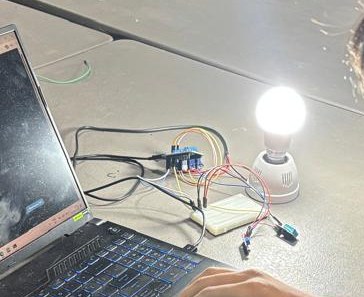
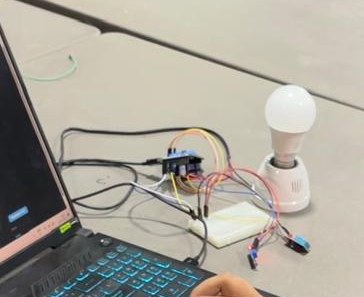
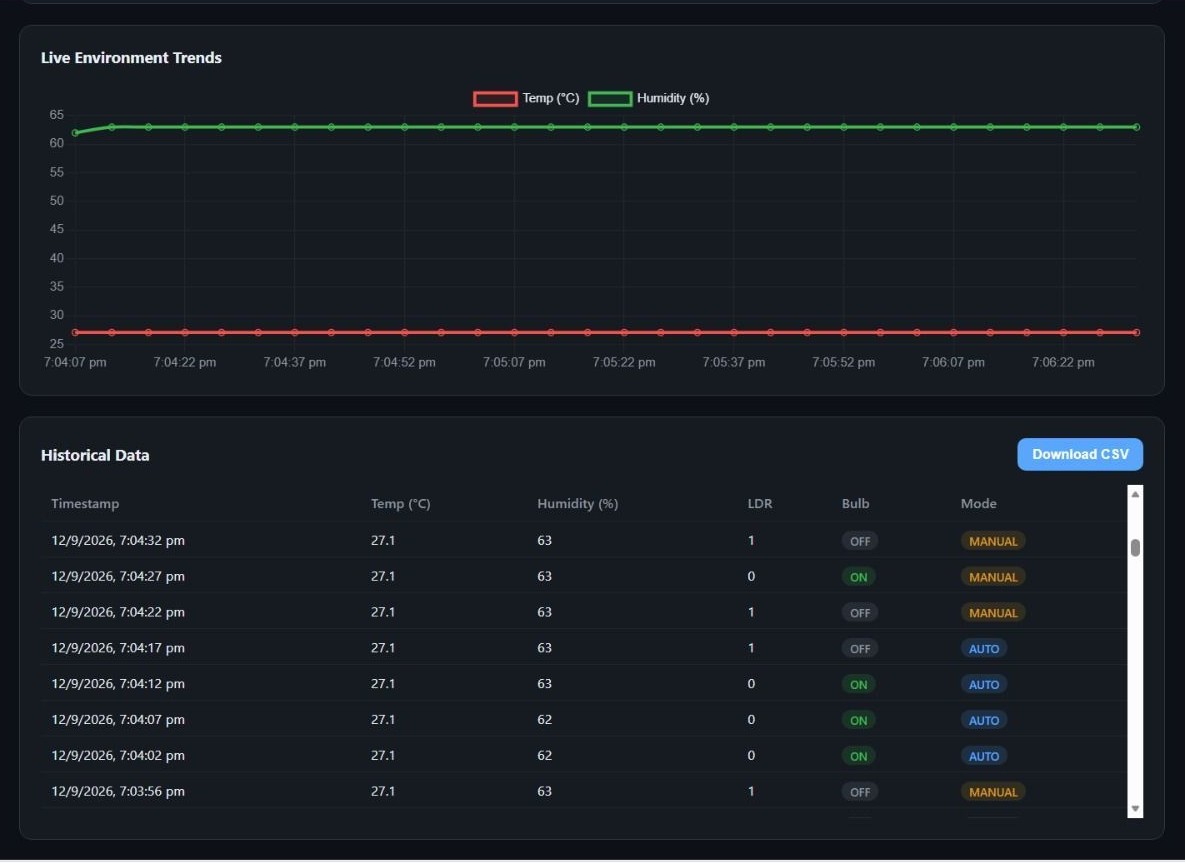
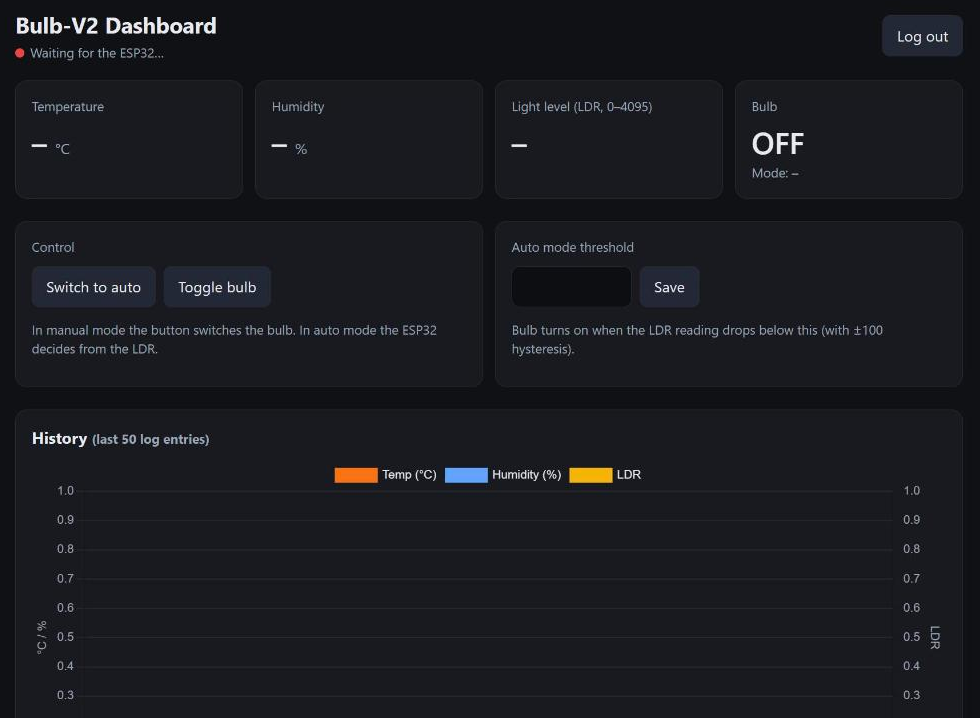


9Challenges & Fixes
Problem. In auto mode the dashboard showed the wrong bulb state.
Why. If the ESP32 switches the relay on its own, /bulb/status still holds the last manual value.
Fix. In auto mode the ESP32 writes its decision back to /bulb/status, so the dashboard always shows what the bulb is really doing.
Problem. The bulb flickered when the light level was close to the threshold.
Why. LDR readings are noisy, so a single threshold flips back and forth.
Fix. Added ±100 hysteresis around the threshold.
Problem. Log timestamps need a clock the ESP32 doesn't have.
Why. The ESP32 has no real-time clock, and millis() resets on every boot.
Fix. Used the Firebase server timestamp (.sv), which also gives the dashboard and the CSV real dates.
Limitations
- The LDR sits near the bulb, so in auto mode the bulb's own light can push the reading back over the threshold. Hysteresis helps, but placement matters.
- Logs grow forever. At one row every 30 s that is about 2,900 rows a day; Firebase's free tier will hold it for a while, but old rows should be deleted or archived.
- The DHT11 is only accurate to about ±2 °C and ±5 % humidity.
- Everything depends on Wi-Fi and Firebase being reachable; with no connection the bulb keeps its last state.
- One shared login for the dashboard and the device; the rules don't separate what each may write.
Future improvements
- Per-path rules: only the device account may write
/sensorsand/logs. - Keep a local auto mode running on the ESP32 when offline.
- Replace the DHT11 with a BME280 for better accuracy.
- A scheduled clean-up of logs older than a week.
- Move the LDR away from the bulb, or switch the bulb from a time schedule plus the LDR.
10Reflection
The whole module came together here. The ESP32, the database and the dashboard each have one job, and they only agree on a handful of paths, which made it easy to add logging and an automatic mode without touching how the earlier parts worked. The most useful habit I picked up is writing the real state back instead of assuming a command worked, the same idea as the confirmed state in my LCU-1 panel.
11Repository Link
All code for this task: https://github.com/TringyTrongy/protosem-iot/tree/main/task5-logging-automation (dashboard v2) and https://github.com/TringyTrongy/protosem-iot/tree/main/task4-firebase-dashboard/firmware (ESP32 firmware with logging and auto mode)
✓Checklist coverage
Every item from the IoT Portfolio Guide for this task, and where it is on this page.
| Guide item | Where |
|---|---|
| Objective of the complete IoT system | 1. Overview |
| Final system architecture | 3. System Design |
| DHT11 temperature and humidity monitoring | 8. Evidence |
| LDR light-level monitoring | 8. Evidence |
| Manual bulb control | 6. Implementation |
| Automatic bulb control using the LDR | 6. Implementation |
| Manual / automatic mode documented | 2. Concepts |
| Logic for automatic lighting | 3. System Design |
| LDR threshold / calibration method | 5. Wiring / Setup |
| Historical data logging in Firebase | 6. Implementation |
| Database structure for logs | 6. Implementation |
| Timestamped sensor readings | 6. Implementation |
| Temperature and humidity recorded | 6. Implementation |
| LDR values recorded | 6. Implementation |
| Bulb status and mode recorded | 6. Implementation |
| Historical data on the dashboard | 6. Implementation |
| Graph / chart of recorded data | 6. Implementation |
| CSV download | 6. Implementation |
| Downloaded file shown to contain the data | 8. Evidence |
| Screenshots of Firebase log data | 8. Evidence |
| Screenshots of the dashboard and chart | 8. Evidence |
| Photographs of the complete prototype | 8. Evidence |
| Problems and solutions | 9. Challenges & Fixes |
| Limitations of the prototype | 9. Challenges & Fixes |
| Future improvements | 9. Challenges & Fixes |
| Final learning reflection | 10. Reflection |
| All source code in the repository | 11. Repository Link |